
Stylish White Carbon Theme for Chrome
Overview
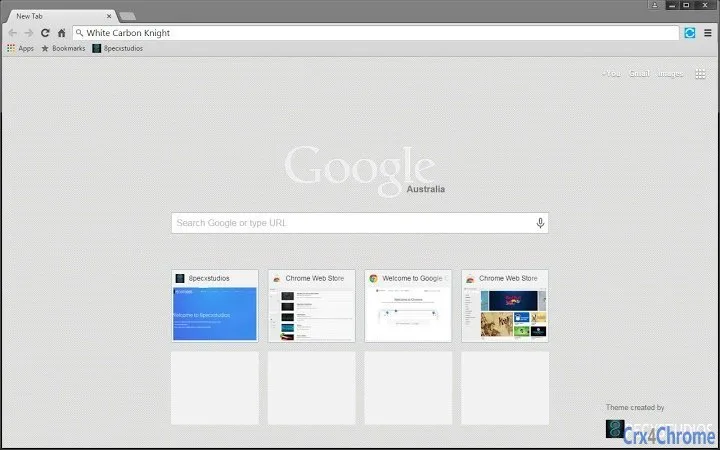
White Carbon Knight is a browser theme designed for users seeking a clean, modern aesthetic within the Chrome ecosystem. The theme features a minimalist white interface paired with a subtle carbon fiber background, offering a visually striking yet unobtrusive look. It is intended to elevate the visual experience of the Chrome browser without compromising functionality. The theme is suitable for professionals, designers, and casual users who value a polished and consistent digital workspace.
Developed by 8pecxstudios, the theme is part of a broader collection of browser customizations available through the Chrome Web Store. Its primary purpose is to personalize the browser’s appearance, providing a unique visual identity while maintaining usability. The theme does not alter browser behavior or performance, focusing solely on aesthetics. Real-world usage scenarios include daily browsing, work-related tasks, and creative projects where a refined interface enhances focus and satisfaction.
Key Features & Capabilities
- Minimalist White Design – A clean, white interface reduces visual clutter, promoting a focused browsing environment.
- Carbon Fiber Background – A textured carbon pattern adds depth and sophistication to the theme’s appearance.
- One-Size-Fits-All Compatibility – Designed to work seamlessly across different screen resolutions and Chrome versions.
- Easy Installation – Available directly through the Chrome Web Store for quick setup with minimal steps.
- Non-Intrusive Customization – No changes to browser functionality; the theme only affects visual elements.
Users can apply the theme to create a consistent look across devices, ideal for those who use multiple machines or maintain a branded digital presence. The theme’s design supports both light and dark mode environments, adapting smoothly to user preferences. It is particularly useful for individuals who use Chrome for content creation, research, or productivity, where a visually pleasing interface contributes to workflow comfort.
User Interface, Workflow & Performance
The user interface of White Carbon Knight is entirely visual, affecting only the browser’s chrome—toolbar, tabs, and background. Navigation remains unchanged, ensuring a familiar experience for all users. The theme’s design prioritizes clarity and elegance, with no overlays or animations that could disrupt workflow. The developer did not specify resource usage details, but as a theme, it is expected to have minimal impact on system performance.
Stability is maintained through integration with the Chrome browser’s native theme system. Updates are managed automatically via the Chrome Web Store, ensuring compatibility with future browser releases. General performance observations are based on typical behavior of lightweight browser themes, which usually consume negligible CPU and RAM. No reported issues with crashes or interference with extensions were noted in available documentation.
Compatibility & System Requirements
White Carbon Knight is compatible with Windows, Mac, and Linux operating systems, ensuring broad accessibility across desktop platforms. It is designed for use with Google Chrome, though specific version requirements were not listed. The installation size is 1.2 MB, indicating a lightweight deployment. The developer did not provide additional system requirements.
Users are advised to ensure their Chrome browser is up to date for optimal compatibility. While the theme is designed to be universal, performance may vary slightly depending on hardware capabilities and screen resolution. Exact system requirements were not listed, so users should rely on standard Chrome compatibility standards.
Pros and Cons
Pros
- Visually appealing white and carbon fiber design
- Lightweight and fast to install
- Compatible with major desktop operating systems
- Free to download and use
- Non-intrusive; does not affect browser functionality
Cons
- No customization options for color or pattern
- Only available for Chrome browsers
- Design may not suit all user preferences
- Limited to visual changes; no functional enhancements
- Updates depend on Chrome Web Store automation
FAQ Section
Is White Carbon Knight compatible with all Chrome versions?
The theme is designed to work with current and recent Chrome releases. Specific version compatibility was not provided by the developer.
Can I use this theme on multiple devices?
Yes, as long as the devices have Chrome installed and access to the Chrome Web Store, the theme can be applied across systems.
Is the theme safe to install?
Yes, the theme is distributed through the official Chrome Web Store, which includes security checks for extensions and themes.
Does the theme affect browser speed or performance?
As a visual theme, it is expected to have minimal impact on performance. No significant resource usage was reported.
Is White Carbon Knight available for browsers other than Chrome?
Currently, the theme is only available for Google Chrome. No versions for Firefox, Edge, or other browsers were listed.
Final Thoughts
White Carbon Knight delivers a refined, stylish interface for Chrome users who appreciate modern design. Its minimalist white palette combined with a carbon fiber texture creates a professional and visually engaging experience. While it offers no functional improvements, its aesthetic value is significant for users seeking a polished browsing environment. The theme is free, lightweight, and compatible across Windows, Mac, and Linux.
For professionals, creatives, and anyone who values a clean digital workspace, this theme is a worthwhile addition. It enhances the visual appeal of the browser without compromising performance or security. The lack of customization options is a minor limitation, but the theme’s simplicity ensures broad appeal.
Download White Carbon Knight now for a sleek, modern Chrome experience.







